Description
The Guidance Computer is a specialized Computer that constructs and manages software chains for spacecraft attitude determination and control. It enables users to configure and switch between different guidance modes during a simulation without manually constructing software modules. The computer automatically handles message routing between chains and manages chain state transitions.
Example Use Cases
- Alternating Pointing Modes: Switch between sun-pointing for power generation and nadir-pointing for Earth observation based on mission phase.
- Simplified GNC Stack: Add a guidance computer and select chain types without manually building the full software stack.
- Mode-Based Operations: Implement autonomous mode switching based on spacecraft state or ground commands.
Module Implementation
Software Chains and Sequences
A software chain is a series of software modules linked together via the messaging system. A software sequence is a collection of software chains that can be swapped at runtime while maintaining consistent message interfaces.
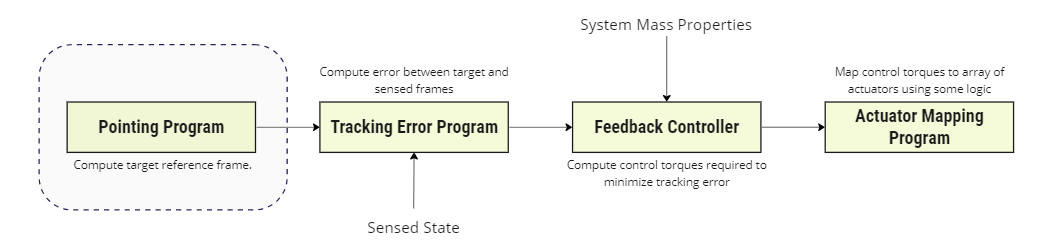
The guidance computer creates a GuidanceSoftwareChainSequence consisting of four chain categories:
- Navigation Chain
- Pointing Chain
- Controller Chain
- Mapping Chain
Each chain can consist of one or many software modules. All chains within a category must have compatible input and output messages to connect with adjacent chains.

Chain Categories
| Chain Category | Description | Output Messages |
|---|---|---|
| Navigation | Estimates spacecraft position and orientation from sensors | NavigationAttitudeMessage, NavigationTranslationMessage |
| Pointing | Computes reference frame orientation for target alignment | AttitudeReferenceMessage, AttitudeErrorMessage |
| Controller | Computes control torque to achieve desired attitude | CommandTorqueMessage |
| Mapping | Maps command torque to actuator commands | Actuator-specific |
Available Chains
| Chain Name | Category | Purpose |
|---|---|---|
| Simple | Navigation | Estimates position and attitude by applying errors to true state |
| Sun Estimation | Navigation | Estimates attitude using sun sensor measurements |
| Inertial | Pointing | Aligns spacecraft to an inertial reference frame |
| Sun | Pointing | Aligns a body vector toward the sun for power optimization |
| Velocity | Pointing | Aligns a body vector along the orbital velocity direction |
| Nadir | Pointing | Aligns a body vector toward a celestial body (e.g., Earth) |
| Ground | Pointing | Aligns a body vector toward a ground station |
| Relative | Pointing | Aligns a body vector toward another spacecraft |
| Idle | Controller | Produces no torque commands |
| MRP | Controller | Modified Rodrigues Parameter feedback controller |
| Reaction Wheels | Mapping | Maps torque commands to reaction wheel array |
| Magnetic Torque Bars | Mapping | Maps torque commands to magnetic torque bars |
Mode Switching
Each chain category has a mode property that can be changed at runtime:
NavigationModePointingModeControllerModeMappingMode
When a mode changes, the guidance computer disables the previous chain and enables the new chain. Message routing between chains is automatically updated to maintain correct data flow.
Computer State Integration
The guidance software sequence is enabled when the computer transitions to the Running state and disabled when it transitions to Shutdown. This ensures software chains only execute when the computer is operational.
Assumptions/Limitations
- Only one chain per category can be active at a time.
- All chains within a category must have compatible message interfaces.
- Chain parameters are configured through dedicated accessor methods on the guidance computer.
- The computer must be in the Running state for software chains to execute.